The gamesavailableareorganized into several categories:Arcade,Board Games,First PersonShooter,Strategyetc..Just chooseyour favorite category tosee whatis available fordownload. Select a gamefrom thepresented list andhave access toa summary, a text description,an image,whetheror not itsupportsmultipleplayers,if you needan account toplay, ...
The programis very simplein its operation: firstlyrequires no installation, just unzip theZIP file,run the wizardsimplybe takenthrough the processof research of ourPCand,if necessary, clean anymalwareand /orrootkit.
Thisisa toolnot only to searchbut alsorepair thedamage done byanymalicious softwarein oursettings.In the eventof losingInternet access,for example, ortheWindows Update/Windows Firewallstops working,thenthis appmay be able tohelp us.
IMPORTANT:Beaware thatthis programisstilla betaso you willseesomeregularfalse alarmsduringthe discovery processorthatstill needtoimprove the functioningof the program.
Duringa sessionof thepopularAMAA(Askmealmost anything)thatwas recently heldon the platformof contentsReddit,PanosPanay,vicepresident ofMicrosoftand elements oftheSurfaceengineering teamanswered aset ofquestionsfor theSurface,versionPRO.
One of thequestions posedby the userNygmaticwas if thenew tablet fromMicrosoftallows to disablethesecurebootso they caninstallegLinux distributions. In responseelements ofMicrosoftstated that it ispossible to disablethisfunctionality,like anymachinewith Windows 8,allowingthe installationof Linux distributions.However, thisonly applies toSurfaceSurfaceProsince theRTis onlylimited to Windows.
There are severalsoftwarecapable of managingapplications thatstartwith ouroperating system,butno one candelay the startupof these applications,such as MyStartup Delayerdoes.
WithMyStartup Delayerwecanpostponethestartof applications anddistribute them in time, making yourcomputer fasterto bootandbecome available.
PuranUtilitiesis acompleteandusefulfree tool thatprovides itsusers with aset ofmore than 20utilities forpropermaintenanceof ourWindows operating system.With all the optionsavailablewe canget better performancefrom our computerwith the greatadded valueof the 'automatic mode',that with justa click of themousekeepsyour computerclean and free oferrors.
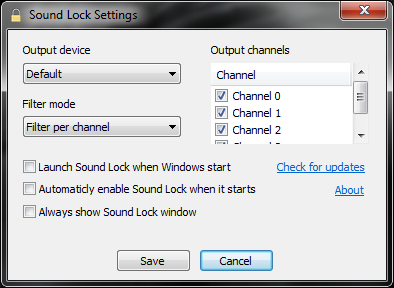
SoundLockisa smalland smarttool that doesexactlywhat the namesays,allows
you to limitthe output levelofthesoundreproductionby detecting theplayback volumereducing ittothe
levelpreviously setby us.
When
you activate theSoundLock, you don’t needto adjustthe soundaccording to thescenesof a movie orgame type, because theSoundLockautomatically
adjuststhe system volumeper
channel(up to 14 channels),
and generates asoft soundaround theexistingplaybackthus leading toglobal harmonizationof sound.
The
controlsavailable allow us toeasilyset the limitsound outputby draggingthe slider tothe levelwe desire. For bettersound levelblockSoundLockallows you to setlevelsper channelor
device.
License: Freeware OS: Windows Vista/7/8 Download: Sound Lock 1.3.1[553 KB]
The security updateis toplug ahole inJavathat was recentlyadded to theBlackholeexploittool.Despite the urgencyand importanceof this componentof the upgrade, Oraclemakes no mentionaboutthe dangerousnessof the situation andthe updatedubbedsimply"RecommendedVersion 7Update 7".
It has beenconfirmedthat thevulnerability affectsusersofWindows,LinuxandMacOSX.Thebugis presentinJRE1.7isthe latest version.Applehad decided,since theLionversionof last yearthat it wouldstop offeringJava installedon their machines,thatpolicyremainedwith theMountainLion.However, users canmanually installJavaon your computer.
Thecomputer security expertTodBeardsleyalso confirmed thatthe flawaffectsMacs.Justyouhave thisversion ofJavainstalledand visitany pagethat has been configuredfor an attackandis replaced byyour computerat the mercy ofhackers.
It is expectednowthat Oraclecanrelease asecurity updatefor failure.For nowyou should keeptheversion1.6 ordisable Javain your browser.
How to improvea wireless network? In thisarticle I willgive some tipsto try to improvethe qualityofwireless signalin our house,in order to havea more stable network,withfewer breaksand abetterdebt.
1 -Place thewirelessrouter(or access point)at the midpoint
Sowe can getcover moreareas(bedroom, living room, kitchen,etc.)from our house, causingthe signal tohigher quality.If we putouraccess pointat one end,possiblyat the other endthesignal strengthis not the best.
2 -Keep therouteraway from walls,metal objects, glass,etc.
We musttry tomove awayourWiFirouter from metals, some types offloors, glassor othersurfaces thatare subject tointerference.Equipment such asmicrowaves,drills,etcarealsoa lot of interferencesources.Makean analysis ofthespectrum.
3 -Replacethe antennaof the router (if possible)
The antennasthat come withtherouterare usuallyomni-directionalsignalthat istransmittedin all directions.Ifyour router isnearan outside wall,'half'of the signalwill not bepassedbecause it will bediffusedout of the house(for example).In this sensewe can choosean antenna withmore gain(DBIS)and alsodirectional orsectoral,focusingthe signalin a place/areaspecific.
The gameLeft 4Dead 2hada14% higherperformanceon a Linux system compared to aWindows systemwith the samehardware configuration.
The game wastestedon a machinewith an IntelCorei73930k,NvidiaGeForceGTX680 and32GB ofRAM.In thesystem withUbuntu12 andOpen GL, thegame hasaperformanceof 315FPS,while theWindows 7 machinewasupby270.6FPS.
The research teamconcluded that theValveOpen GLis more efficientto processdata thanDirect3Dtechnology.TheLinuxValveteamwill still haveto battlea lot, especiallyto getwork with thegraphics card manufacturerssuch asAMDorNvidia.
These testsare publisheddays afterthe CEO ofValvehave statedthat Windows 8wasadisaster andthat the companywould turnoverto Linux.
Microsoft hasjust confirmedthe pricetoupgradefrompreviousversions of Windows andis clearly demonstratedthat the betis towardsamassupdate, especiallyfor those stillusing Windows XP orVista.
The methodof upgrading toWindows 8will be assimple as possible, froman older version,without the usualcomplications offormatsand "boots"from anotherdrive.The assistant thatallows you to dosoonline,is capable of generatingacompletecompliance reportdetailing theproblemsthat may ariseafter theupgrade, whichmay stop workingand whatneeds to be doneto avoid such problems.
There will also beable to choosewhether tokeep some informationfrom your oldWindows.Inthree
Will betwodifferent base models, onewith WindowsRT, and the otherwith WindowsPro8Each one of these models will havesub-models with differentcapabilities.
It has now beenreleased another version, the Release Preview, which goes to showwhat has been donesince Februaryand thatmay be the lastpublic releasebefore the official launchof Windows 8.
This new version, availablein 14 languages, includes, in addition to Windows 8, InternetExplorer10 and8newWindows applicationsto connect toHotmail, MessengerandSkyDrive(and more). Were alsoaddedhundreds ofnew applicationsinWindowsStore.
System Requirements
TheWindows 8PreviewReleaseworks on the samehardwarethat Windows 7:
Processor:1gigahertz (GHz) or faster
RAM: 1gigabyte(GB) of RAM(32bit) or2GB ofRAM(64bits)
To use thetactilefeatures, you need a tabletor monitorthat supportsmultitouch.
To visit theStoreWindows andto downloadapplicationsand run them, you need anactive Internetconnectionandascreen withaminimum resolution of1024x768. To dockapplications, you need a screen withaminimum resolutionof 1366x768. Internet access
A set ofHumanInterfaceGuidelines(HIG) to guidedeveloperson bestpractices for creatingUser InterfacesusingNaturalKinect.
The SDKface tracking, which providesa mechanismReal time3D, capable ofsimultaneously detectingthefacial gestures,the head position, the locationof the eyebrowsand theshape of the mouth.
Controlthe movementof the skeleton"sitting"or "10joints",which controls themovement of the head, neckand armsof a usersitting or standing.
ThePreviewReleaseversionof Windows 8to hit the marketnext month andMicrosoft has alreadyannounced it willrenew theaspect ofsome of its applications.
Mail,Calendar,People,Messaging,Photos,Musicand MicrosoftReader areMicrosoft applicationsthat willchange.Interface changesand removalof the phraseAppPreviewof the application nameare the twomain innovations.
Microsoft needs to demonstrate the benefits of Metro apps in order to
help convince PC users to take a dip into the new operating system.
We'll get a taste of the updated apps once the Windows 8 Release Preview appears in early June.