Adv

Showing posts with label Software. Show all posts

Wednesday, April 24, 2013

Game downloader 3.8: more then 300 free games

Game Downloader is a compact application that helps you find, download and play over 320 games totally free.

The games available are organized into several categories: Arcade, Board Games, First Person Shooter, Strategy etc.. Just choose your favorite category to see what is available for download.
Select a game from the presented list and have access to a summary, a text description, an image, whether or not it supports multipleplayers, if you need an account to play, ...

License: Freeware
OS: Windows XP / Vista / 7 / 8
Download: Game Downloader 3.8 
Homepage: Devfire 

Friday, February 15, 2013

Malwarebytes Anti-Rootkit

The program is very simple in its operation: firstly requires no installation, just unzip the ZIP file, run the wizard simply be taken through the process of research of our PC and, if necessary, clean any malware and / or rootkit.

This is a tool not only to search but also repair the damage done by any malicious software in our settings. In the event of losing Internet access, for example, or the Windows Update / Windows Firewall stops working, then this app may be able to help us.

IMPORTANT: Be aware that this program is still a beta so you will see some regular false alarms during the discovery process or that still need to improve the functioning of the program.
 
Operating System: Windows XP / Vista / 7
 
 
Homepage: Malwarebytes

Thursday, February 7, 2013

Improve your PC startup with Startup Delayer

There are several software capable of managing applications that start with our operating system, but no one can delay the startup of these applications, such as My Startup Delayer does.
With My Startup Delayer we can postpone the start of applications and distribute them in time, making your computer faster to boot and become available.

 New in this version:
  • Localization tool updated with a redesigned interface 
  • Added login for the Localization tool for translators can submit their translations 
  • Update of Czech and Polish languages
  • Forced Process chooser to only allow file names and delete arguments and other parameters
  • Added info button to Notification window to switch between a bar thinner
  • Added some areas of the notifier entrainment
  • Resolution of other minor bugs
Operating System: Windows XP/ Vista/ 7/ 8
Download: My Startup Delayer.exe 
Homepage: My Startup Delayer 

Tuesday, February 5, 2013

Learn how to tune your images

This software allows a simple way to perform tasks that are usually associated with lengthy and complicated process. 
With an intuitive interface has everything easily accessible. Adding new images is done dragging the image to the interface.
 Pros: 
  • Batch processing of images makes the user's job;
  • Lets add watermark to images simply by selecting a second file image;
  • Has profiles adjusted for major social networks and for some devices, like the iPod and iPhone;
  • Fast image processing.
Cons:
  •  Doesn't provide other treatment tool or image adjustment.
Operating System: Windows 98/ ME/ NT/2K/ XP/ Vista/ 7 / 8 (32 e 64 bits)

Download: Image_Tuner.exe

Homepage: Image Tuner


Tuesday, September 18, 2012

Puran Utilities - PC maintenance

Puran Utilities is a complete and useful free tool that provides its users with a set of more than 20 utilities for proper maintenance of our Windows operating system. With all the options available we can get better performance from our computer with the great added value of the 'automatic mode', that with just a click of the mouse keeps your computer clean and free of errors.


  • Disk Check;
  • Uninstaller;
  • Startup Manager;
  • Service Manager;
  • Disk Cleaner;
  • Delete Empty Folders;
  • Fix Shortcuts;
  • Registry Cleaner;
  • Registry Defrag;
  • Puran Defrag;
  • Duplicate File Finder;
  • Data Recovery;
  • Disk Files;
  • Gaming PC;
  • Permanente Delete;
  • Disk Wipe;
  • Shutdown Timer;
  • Splitter;
  • Delete History;
  • Batch Fix
  • Maintenance Wizard;
  • Minimal PC;
  • System Information.


License: Freeware
Operating Systems: Windows Vista / XP / 7 / 8
Download: Puran Utilities 1.0.2[8.73 MB]

Saturday, September 8, 2012

Sound Lock: Lock your sound at desired level


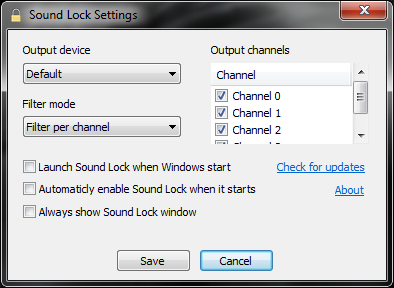
Sound Lock is a small and smart tool that does exactly what the name says, allows you to limit the output level of the sound reproduction by detecting the playback volume reducing it to the level previously set by us.
When you activate the Sound Lock, you don’t need to adjust the sound according to the scenes of a movie or game type, because the  Sound Lock automatically adjusts the system volume per channel (up to 14 channels), and generates a soft sound around the existing playback thus leading to global harmonization of sound.

The controls available allow us to easily set the limit sound output by dragging the slider to the level we desire. For better sound level block Sound Lock allows you to set levels per channel or device.

License: Freeware
OS: Windows Vista/7/8
Download:  
Sound Lock 1.3.1 [553 KB]

Friday, August 31, 2012

Java: Oracle releases emergency update

The security update is to plug a hole in Java that was recently added to the Blackhole exploit tool. Despite the urgency and importance of this component of the upgrade, Oracle makes no mention about the dangerousness of the situation and the update dubbed simply "Recommended Version 7 Update 7".
Remember that this vulnerability in Java 7 allowed hackers write malware to infect a computer just by visiting a website. The problem affects both Windows and Mac
At this time, it is advised that all users who visit the Oracle website to download the update.

Tuesday, July 3, 2012

Microsoft announces upgrade to Windows 8 Pro for $ 39.99

Microsoft has just confirmed the price to upgrade from previous versions of Windows and is clearly demonstrated that the bet is towards a mass update, especially for those still using Windows XP or Vista.

The method of upgrading to Windows 8 will be as simple as possible, from an older version, without the usual complications of formats and "boots" from another drive. The assistant that allows you to do so online, is capable of generating a complete compliance report detailing the problems that may arise after the upgrade, which may stop working and what needs to be done to avoid such problems.

There will also be able to choose whether to keep some information from your old Windows. In three

Tuesday, May 22, 2012

Kinect SDK v1.5 for Windows available to download

In March, the Kinect for Windows was announced that a forthcoming update of the SDK (software development kit) Kinect for Windows, which would display features improved voice and gestures for programmers, enabling companies and organizations to create new innovations magic of Kinect in Windows environments. Yesterday, the version 1.5 SDK Kinect for Windows became available for download.


Some new features:
  • Kinect Studio, a new tool that allows developers to record and reproduce data Kinect.
  • A set of Human Interface Guidelines (HIG) to guide developers on best practices for creating User Interfaces using Natural Kinect.
  • The SDK face tracking, which provides a mechanism Real time 3D, capable of simultaneously detecting the facial gestures, the head position, the location of the eyebrows and the shape of the mouth.
  • Control the movement of the skeleton "sitting" or "10 joints", which controls the movement of the head, neck and arms of a user sitting or standing.
  • New code samples in C + + and C #, and a series of samples "Basic" compatible with the C + +, C # and Visual Basic.
  • Four new speech recognition languages​​, including French, Spanish, Italian and Japanese.
  • New language packs to enable speech recognition by the way the language is spoken in different regions, including English / UK, English / Irish, English / Australia, English / New Zealand, English / Canada French / France French / Canadian, Italian / Italy, Japan / Japan, Spanish / Spain and Spanish / Mexican.
 You can download it here: SDK v1.5

Thursday, May 17, 2012

Windows 8: apps upgraded to Release Preview

The Preview Release version of Windows 8 to hit the market next month and Microsoft has already announced it will renew the aspect of some of its applications.


Mail, Calendar, People, Messaging, Photos, Music and Microsoft Reader are Microsoft applications that will change. Interface changes and removal of the phrase App Preview of the application name are the two main innovations.

Microsoft needs to demonstrate the benefits of Metro apps in order to help convince PC users to take a dip into the new operating system.
We'll get a taste of the updated apps once the Windows 8 Release Preview appears in early June.

Tuesday, May 8, 2012

Tutorial: laptop battery recalibration

Many people wonder whether or not to use the laptop battery when it is plugged. Actually, it's okay to do so, since, once charged, the battery does not get more current and power flows directly to the system.
The only possible problem is the overheating of the computer. If you are playing titles with high graphic needs, the system temperature increases and therefore
the battery must be removed. 

Laptop batteries have a capacity gauge that lets you know with any accuracy the amount of energy stored inside. However, over time, this indicator loses accuracy. For example the user can be informed that the battery still has 10% capacity when in fact it has 5%. For it doesn't happen, it is necessary to use tasks of total discharge and a full charge every 30 discharge.

How to fully discharge the battery:

1- Charge the battery to full capacity and let the battery charged for at least two hours, so the temperature drops;

2- Remove the power adpter and put the computer into hibernation with minimal charge as possible. Use the power schemes in Windows or the Battery Care;

3- Let the battery
discharging;

4- After the computer turns off, turn it on only after about five hours. Connect the power adapter and charge the battery fully. This process ensures an increase in the lifetime of the battery
.

Thursday, April 26, 2012

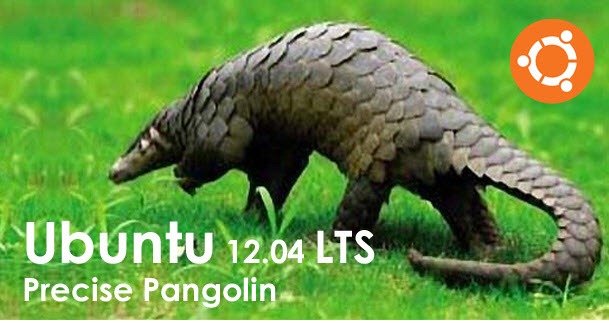
Ubuntu 12.04 Precise Pangolin is out

As provided by the scheduling of Canonical publishes the final version of Ubuntu 4.12 Precise Pangolin is now available for download.

It was on October 5, Mark Shuttleworth (founder of Canonical) announced on his blog that Ubuntu 4.12 would be called Precise Pangolin. According to Mark Shuttleworth's, the "inspiration" for this name was due to the fact that he helped a few hours pangolin and this has demonstrated some resistance and precision.

After six months, as defined by Canonical, finally reached the final version of Ubuntu 4.12 Precise Pangolin.

You can download below:

Ubuntu 12.04 LTS (32bits / 64bits);
Ubuntu Server 12.04 LTS(32bits / 64bits).

Sunday, April 1, 2012

Google Chrome v.18.0

At this moment the most used browser in the world is Google Chrome.
The biggest difference in this new update is GPU acceleration which is activated automatically. With this update the rendering is done with more speed and fluidity of what happened so far. For anyone who plays in the browser is also a great asset games work even more smoothly.
There was also internal improvements, updated V8 javascript engine, security updates based on the vulnerabilities exposed in the Pwnium competition and other changes.

Friday, March 30, 2012

Adobe Photoshop CS6 Beta available for free download

This new version comes with many powerful new tools that will provide an excellent and most advanced professional editing and this first public beta brings some new tools.


The major improvement over the previous versions will be a very advanced GPU acceleration, the acceleration will enable a considerable slower tools such as liquify, in which case an image of 100 MB, was loaded in parts and very slow. Other improvements were made, the size of the brushes had a maximum of 1500 pixels now more than 14,000 pixels. Lag between the cursor and movement of large brushes will be eliminated in version CS6.

Adobe Photoshop CS6 does not have a date or official price, however, Adobe plans to release this version in the first half of this year.

Monday, March 26, 2012

Prezi, make presentations with style

Everyone has used PowerPoint at least once, and wished there were more and better tools.
Prezi is a cloud-based software to prepare presentations, save them, share and publish. This software offers a variety of customizable templates and allows you to include images, videosYouTube content or PDFs for example.

Instead of going with the USB flash drive in the pocket, you can connect to the Internet, access to the service and start to impress the audience. This service is available in three forms, one of them is for free use.

Top 3 Android Antivirus


Increasingly we are using our smartphones and tablets to transport and store all types of personal information and not always understand the potential threats.
However, there are some good antivirus.
Kaspersky Mobile Security:

Kaspersky has been one of the top companies in the Windows security in the world. this company wants also to position itself as one of the best on the security of Android OS.

The Lite version provides antivirus, anti-theft protection and a filter-based calls and SMS. It is a reasonable set of features, but as free antivirus is not very good.
However, the paid version adds scans for applications and also includes the protection of privacy. But the most attractive fact is the price - it costs only $ 9.99 in the Android Market!


Lookout Security and Antivirus:

This company has always been dedicated to the safety of smartphones. The free version is equipped with anti-virus detector, phone features and a backup utility and is among the most effective . As is free, it is a good choice. The paid version costs 30$ for year.


F-Secure Mobile Security

This application is only available on F-Secure site and beside there is no free version.
One of the most important feature is the parental-control, you can block sites or use a filtering content that will block sites which often parents do not approve. There is also a blacklist of phone numbers and even applications that can be configured as the user want to.
The big disadvantage is its price 30€/40$. 

Saturday, March 24, 2012

Keep your Mac clean with CleanMyMac

CleanMyMac detects and removes unnecessary material from your disk, it is safe because it emphasizes the security of your data and in case of doubt, questions the user about the end to give the material assigned to be removed.

 The application looks great but more than that is an intelligent application, for example, when installing an application on Mac OS X, the application could have a variety of tools for developers that does not serve anything to you then this application immediately removes the unnecessary extras.

This software has two versions, a test version where some functions are not available and a full version which costs around 50$ (30€). There are also temporary versions for other prices.

Friday, March 23, 2012

Windows 8 will be launched in October 2012

It's confirmed the launch of that is expected to be the best operating system ever produced by Microsoft. Windows 8 will be on the market in October.

The final version of  this windows will be lanched to desktop, lattops and tablets. This launch coincides with Christmas shopping season so manufacturers can create a timeline to make adaptations and adjustments

I like the new interface "Metro" but I have tested this windows on a virtual machine and is not very appropriated for a desktop. I hope that will be a option to select Metro or something similar to the actual desktop, because this windows is very light, and faster,  the metro interface it's more appropriated to tablets. On my pc i'll keep with windows 7 unless that will be the option refered before. Or maybe buy a tablet for Christmas.