Adv

Showing posts with label Tips. Show all posts

Thursday, February 7, 2013

Improve your PC startup with Startup Delayer

There are several software capable of managing applications that start with our operating system, but no one can delay the startup of these applications, such as My Startup Delayer does.
With My Startup Delayer we can postpone the start of applications and distribute them in time, making your computer faster to boot and become available.

 New in this version:
  • Localization tool updated with a redesigned interface 
  • Added login for the Localization tool for translators can submit their translations 
  • Update of Czech and Polish languages
  • Forced Process chooser to only allow file names and delete arguments and other parameters
  • Added info button to Notification window to switch between a bar thinner
  • Added some areas of the notifier entrainment
  • Resolution of other minor bugs
Operating System: Windows XP/ Vista/ 7/ 8
Download: My Startup Delayer.exe 
Homepage: My Startup Delayer 

Tuesday, February 5, 2013

Learn how to tune your images

This software allows a simple way to perform tasks that are usually associated with lengthy and complicated process. 
With an intuitive interface has everything easily accessible. Adding new images is done dragging the image to the interface.
 Pros: 
  • Batch processing of images makes the user's job;
  • Lets add watermark to images simply by selecting a second file image;
  • Has profiles adjusted for major social networks and for some devices, like the iPod and iPhone;
  • Fast image processing.
Cons:
  •  Doesn't provide other treatment tool or image adjustment.
Operating System: Windows 98/ ME/ NT/2K/ XP/ Vista/ 7 / 8 (32 e 64 bits)

Download: Image_Tuner.exe

Homepage: Image Tuner


Tuesday, September 18, 2012

Puran Utilities - PC maintenance

Puran Utilities is a complete and useful free tool that provides its users with a set of more than 20 utilities for proper maintenance of our Windows operating system. With all the options available we can get better performance from our computer with the great added value of the 'automatic mode', that with just a click of the mouse keeps your computer clean and free of errors.


  • Disk Check;
  • Uninstaller;
  • Startup Manager;
  • Service Manager;
  • Disk Cleaner;
  • Delete Empty Folders;
  • Fix Shortcuts;
  • Registry Cleaner;
  • Registry Defrag;
  • Puran Defrag;
  • Duplicate File Finder;
  • Data Recovery;
  • Disk Files;
  • Gaming PC;
  • Permanente Delete;
  • Disk Wipe;
  • Shutdown Timer;
  • Splitter;
  • Delete History;
  • Batch Fix
  • Maintenance Wizard;
  • Minimal PC;
  • System Information.


License: Freeware
Operating Systems: Windows Vista / XP / 7 / 8
Download: Puran Utilities 1.0.2[8.73 MB]

Saturday, September 8, 2012

Sound Lock: Lock your sound at desired level


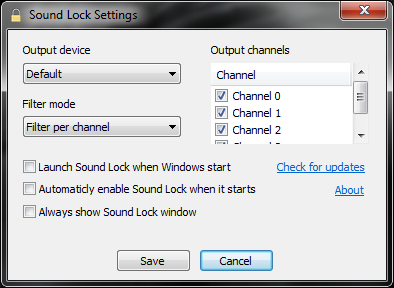
Sound Lock is a small and smart tool that does exactly what the name says, allows you to limit the output level of the sound reproduction by detecting the playback volume reducing it to the level previously set by us.
When you activate the Sound Lock, you don’t need to adjust the sound according to the scenes of a movie or game type, because the  Sound Lock automatically adjusts the system volume per channel (up to 14 channels), and generates a soft sound around the existing playback thus leading to global harmonization of sound.

The controls available allow us to easily set the limit sound output by dragging the slider to the level we desire. For better sound level block Sound Lock allows you to set levels per channel or device.

License: Freeware
OS: Windows Vista/7/8
Download:  
Sound Lock 1.3.1 [553 KB]

Friday, August 31, 2012

Java: Oracle releases emergency update

The security update is to plug a hole in Java that was recently added to the Blackhole exploit tool. Despite the urgency and importance of this component of the upgrade, Oracle makes no mention about the dangerousness of the situation and the update dubbed simply "Recommended Version 7 Update 7".
Remember that this vulnerability in Java 7 allowed hackers write malware to infect a computer just by visiting a website. The problem affects both Windows and Mac
At this time, it is advised that all users who visit the Oracle website to download the update.

Wednesday, August 22, 2012

10 tips to improve our wireless network

How to improve a wireless network?
In this article I will give some tips to try to improve the quality of wireless signal in our house, in order to have a more stable network, with fewer breaks and a better debt.

1 - Place the wireless router (or access point) at the midpoint

So we can get cover more areas (bedroom, living room, kitchen, etc.) from our house, causing the signal to higher quality. If we put our access point at one end, possibly at the other end the signal strength is not the best.
 

2 - Keep the router away from walls, metal objects, glass, etc.

We must try to move away our WiFi router from metals, some types of floors, glass or other surfaces that are subject to interference. Equipment such as microwaves, drills, etc are also a lot of interference sources. Make an analysis of the spectrum.


3 - Replace the antenna of the router (if possible)

The antennas that come with the router are usually omni-directional signal that is transmitted in all directions. If your router is near an outside wall, 'half' of the signal will not be passed because it will be diffused out of the house (for example). In this sense we can choose an antenna with more gain (DBIS) and also directional or sectoral, focusing the signal in a place / area specific.