Adv

Saturday, February 9, 2013

Microsoft Surface Pro allows to run Linux

During a session of the popular AMAA (Ask me almost anything) that was recently held on the platform of contents Reddit, Panos Panay, vice president of Microsoft and elements of the Surface engineering team answered a set of questions for the Surface, version PRO.

One of the questions posed by the user Nygmatic was if the new tablet from Microsoft allows to disable the secure boot so they can install eg Linux distributions. In response elements of Microsoft stated that it is possible to disable this functionality, like any machine with Windows 8, allowing the installation of Linux distributions. However, this only applies to Surface Surface Pro since the RT is only limited to Windows.

Surface Pro will be on sale tomorrow from $899.
 

Thursday, February 7, 2013

Improve your PC startup with Startup Delayer

There are several software capable of managing applications that start with our operating system, but no one can delay the startup of these applications, such as My Startup Delayer does.
With My Startup Delayer we can postpone the start of applications and distribute them in time, making your computer faster to boot and become available.

 New in this version:
  • Localization tool updated with a redesigned interface 
  • Added login for the Localization tool for translators can submit their translations 
  • Update of Czech and Polish languages
  • Forced Process chooser to only allow file names and delete arguments and other parameters
  • Added info button to Notification window to switch between a bar thinner
  • Added some areas of the notifier entrainment
  • Resolution of other minor bugs
Operating System: Windows XP/ Vista/ 7/ 8
Download: My Startup Delayer.exe 
Homepage: My Startup Delayer 

Wednesday, February 6, 2013

Ouya arrives in June

The console is based on Android and is the recordist in fundraising on Kickstarter. The community responded enthusiastically to the idea of ​​a console based on Android, which guarantees access to a wide selection of games to enjoy on television.

 
The first consoles Ouya cost $ 99.99 (73 euros) and includes a gamepad. The user can then buy more commands, for $ 49.99 (36 euros) each. Information is available on the official website of the company. 

Right now, the company is already accepting pre-orders of the console. The first Ouya must get to the major stores in U.S. during the month of June.

Tuesday, February 5, 2013

Learn how to tune your images

This software allows a simple way to perform tasks that are usually associated with lengthy and complicated process. 
With an intuitive interface has everything easily accessible. Adding new images is done dragging the image to the interface.
 Pros: 
  • Batch processing of images makes the user's job;
  • Lets add watermark to images simply by selecting a second file image;
  • Has profiles adjusted for major social networks and for some devices, like the iPod and iPhone;
  • Fast image processing.
Cons:
  •  Doesn't provide other treatment tool or image adjustment.
Operating System: Windows 98/ ME/ NT/2K/ XP/ Vista/ 7 / 8 (32 e 64 bits)

Download: Image_Tuner.exe

Homepage: Image Tuner


Sunday, September 23, 2012

First video with the gameplay of Bad Piggies

In less than one week will be released Bad Piggies for Android and iOS devices. Rovio has finally decided to show how it will be this game that brings the evil pigs of Angry Birds series known as main characters.

Bad Piggies will have a very different gameplay of Angry Birds. Is a puzzle game that will put players to exercise creativity. Here we have to build cars and airplanes from simple materials to bring pigs from one point to another in scenarios filled with obstacles.


Bad Piggies arrives on the 27th for Android and iOS versions for PC, Mac, and Windows Phone will arrive later.

Tuesday, September 18, 2012

Puran Utilities - PC maintenance

Puran Utilities is a complete and useful free tool that provides its users with a set of more than 20 utilities for proper maintenance of our Windows operating system. With all the options available we can get better performance from our computer with the great added value of the 'automatic mode', that with just a click of the mouse keeps your computer clean and free of errors.


  • Disk Check;
  • Uninstaller;
  • Startup Manager;
  • Service Manager;
  • Disk Cleaner;
  • Delete Empty Folders;
  • Fix Shortcuts;
  • Registry Cleaner;
  • Registry Defrag;
  • Puran Defrag;
  • Duplicate File Finder;
  • Data Recovery;
  • Disk Files;
  • Gaming PC;
  • Permanente Delete;
  • Disk Wipe;
  • Shutdown Timer;
  • Splitter;
  • Delete History;
  • Batch Fix
  • Maintenance Wizard;
  • Minimal PC;
  • System Information.


License: Freeware
Operating Systems: Windows Vista / XP / 7 / 8
Download: Puran Utilities 1.0.2[8.73 MB]

Saturday, September 8, 2012

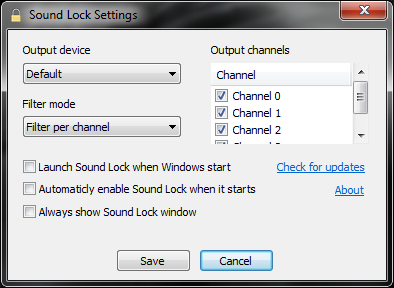
Sound Lock: Lock your sound at desired level


Sound Lock is a small and smart tool that does exactly what the name says, allows you to limit the output level of the sound reproduction by detecting the playback volume reducing it to the level previously set by us.
When you activate the Sound Lock, you don’t need to adjust the sound according to the scenes of a movie or game type, because the  Sound Lock automatically adjusts the system volume per channel (up to 14 channels), and generates a soft sound around the existing playback thus leading to global harmonization of sound.

The controls available allow us to easily set the limit sound output by dragging the slider to the level we desire. For better sound level block Sound Lock allows you to set levels per channel or device.

License: Freeware
OS: Windows Vista/7/8
Download:  
Sound Lock 1.3.1 [553 KB]